User Flows in Delve
Key User Flows in Delve
1. User Authentication Flow
Objective: Allow users to sign up, log in, and gain secure access to their personalized data.
-
Step 1: User visits the application via HTTPS
Users start by navigating to the Delve web interface. - Step 2: User registers or logs in
The user either signs up for a new account or logs in using their credentials.- The AWS Cognito service handles the user authentication, ensuring secure login.
-
Step 3: Token Generation
Upon successful authentication, AWS Cognito issues an access token to the user, which will be used for accessing resources associated with their account. - Step 4: User gains access to the dashboard
The user is granted access to their personal dashboard, where they can view and manage their files, vulnerability reports, and SBOM data.
2. File Upload and Processing Flow
Objective: Enable users to submit source code, containers, or SBOM files for vulnerability analysis and generate SBOMs.
- Step 1: User uploads a file (source code, container, or SBOM)
- The user selects and uploads a file through the web interface.
- The file is passed to the API hosted on the backend processing server (via Express).
- Step 2: Data processing on the backend
- The backend processes the file using Syft (for SBOM generation) and Grype (for vulnerability scanning).
- A DynamoDB entry is created with metadata about the file, including the vulnerabilities detected.
- Step 3: Output file and report creation
- After processing, the output (SBOM file and/or vulnerability report) is saved to S3.
- The user’s DynamoDB entry is updated with links to the results (SBOM file, report, etc.).
- Step 4: Notification of completion
- The user receives a notification that their file has been processed and the results are ready.
3. Viewing and Downloading Results Flow
Objective: Allow users to retrieve and view processed results, such as vulnerability reports or SBOM files.
-
Step 1: User navigates to the results page
The user clicks on a link within their dashboard to view the results of their uploaded file. - Step 2: User views vulnerability reports
- The user is presented with a detailed vulnerability report that lists all detected issues within the software dependencies.
- Each issue includes additional information like severity, description, and recommendations for fixing the vulnerability.
- Step 3: User downloads SBOM or report
- If the user wants to download their SBOM file or vulnerability report, they can click on a download link.
- The S3 bucket serves the requested file securely.
4. User Data Management Flow
Objective: Allow users to manage their files and vulnerabilities over time.
-
Step 1: User uploads new or additional files
The user uploads additional files for analysis or revisits previous results to check for updates. - Step 2: User manages or deletes files
- The user can choose to delete or archive older files and reports from their dashboard, ensuring they only have relevant data available.
- Deleting files from the dashboard will remove entries from S3 and DynamoDB.
- Step 3: User accesses historical data
The user can view historical reports and SBOMs at any time by navigating through their dashboard, which presents a timeline of previously uploaded files and generated reports.
5. Authentication and Authorization for File Access Flow
Objective: Ensure that users can only access their own files and data securely.
-
Step 1: Authentication via AWS Cognito
Users authenticate using AWS Cognito, which ensures they have proper credentials to access the application. - Step 2: File access control using user-specific tokens
When requesting files or data, the access token attached to the user’s session will be checked.- The token ensures the user can only retrieve their files stored in S3 and related entries in DynamoDB.
- If the user attempts to access someone else’s data, the request will be denied with an error response.
- Step 3: Data Access on the Frontend
Once the user has been authenticated, the frontend will request data from the DynamoDB database and S3, but only for the files associated with their user ID.
User Flow Diagram
To visualize these flows, here is a diagram that shows the interaction between the key components of the system:
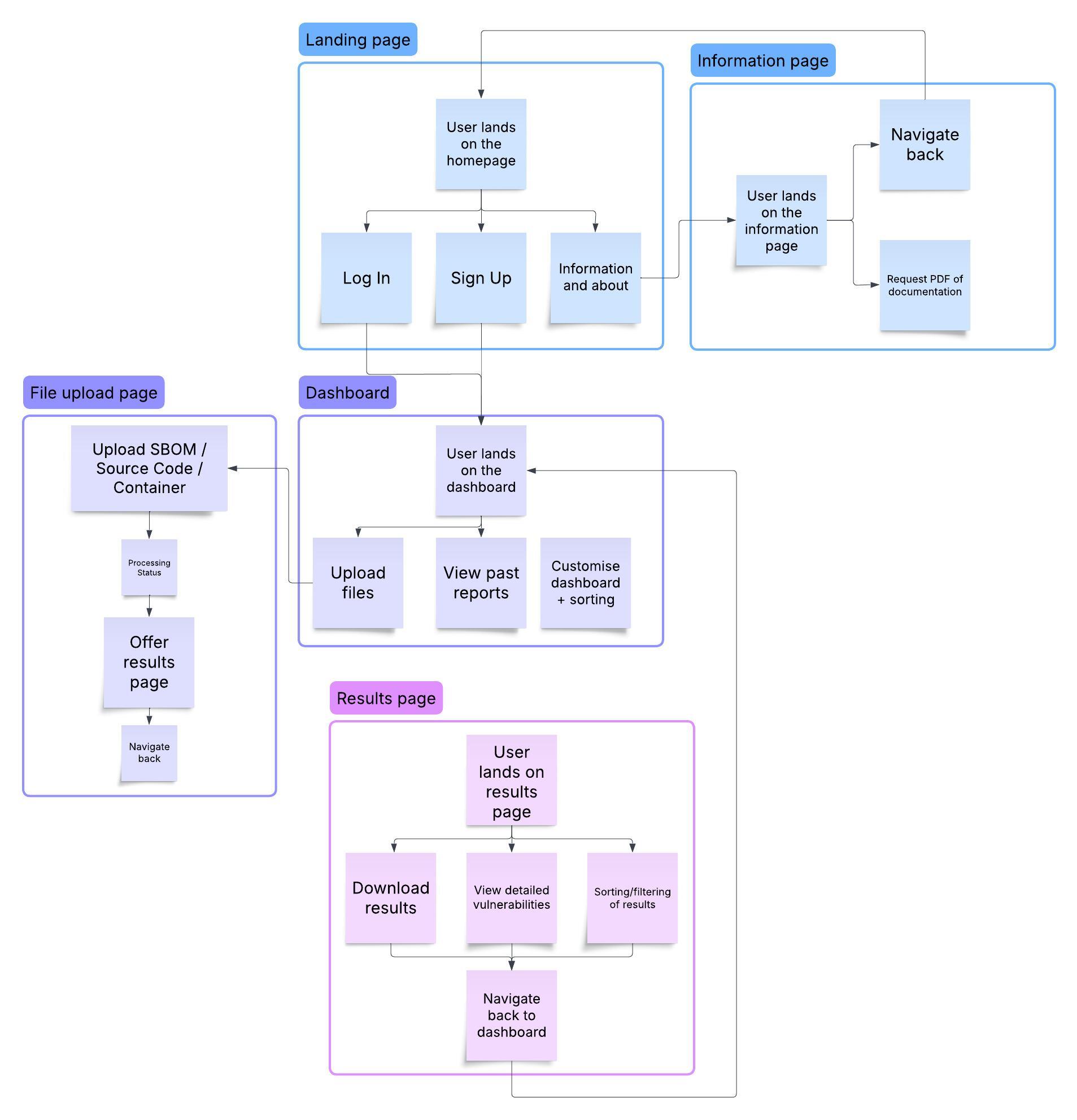
These user flows provide a clear, step-by-step guide for users interacting with Delve. From signing up and uploading files to accessing processed reports and managing their data, Delve ensures a streamlined, secure, and efficient experience for managing software vulnerabilities.