Architecture of Delve
AWS Architecture Overview
This diagram outlines the backend architecture of the Delve application, focusing on scalability, security, and ease of use.
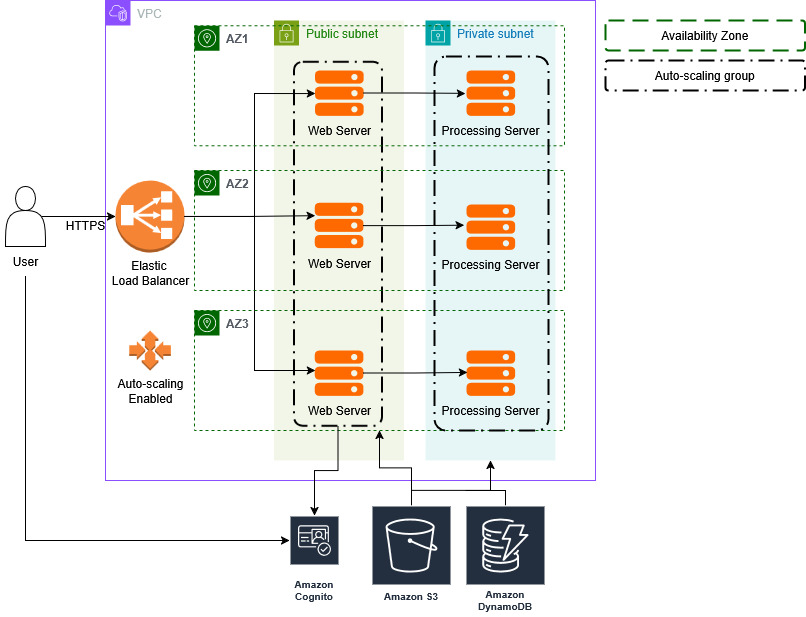
High-Level Flow
- User Access:
- Users connect to the application over HTTPS, ensuring secure communication.
- The traffic is first routed to an Elastic Load Balancer (ELB), which balances the workload across multiple instances to provide scalability.
- Authentication:
- Upon visiting the application, users will sign up or log in.
- AWS Cognito will handle user authentication, validating their identity and issuing access tokens.
- These access tokens are used to grant users access to their specific data and reports stored in the DynamoDB database.
- Data Access & Retrieval:
- When users request a specific report, the web server fetches the relevant data from DynamoDB.
- For users requesting downloadable files (such as SBOMs or detailed reports), files are served directly from the S3 Bucket.
- Data Submission & Processing:
- Users can submit application source code, containers, or SBOMs to the platform.
- These submissions are sent to the backend processing server through an Express API running on the server.
- The user ID is passed along with the data to ensure proper association with their account.
- Data Storage:
- After the backend processes the user-submitted data (e.g., generating SBOMs and vulnerability reports), the resulting input and output files are saved in S3 for storage.
- The DynamoDB database is updated with an entry containing metadata about the processed data, such as the generated SBOM and vulnerability report.
- User Dashboard:
- Users can access a comprehensive dashboard that displays the dependencies within their applications, helping them monitor and manage their software’s security.
- The dashboard allows users to easily identify vulnerabilities, outdated components, and take necessary actions to maintain their applications.